 GOEZ
GOEZ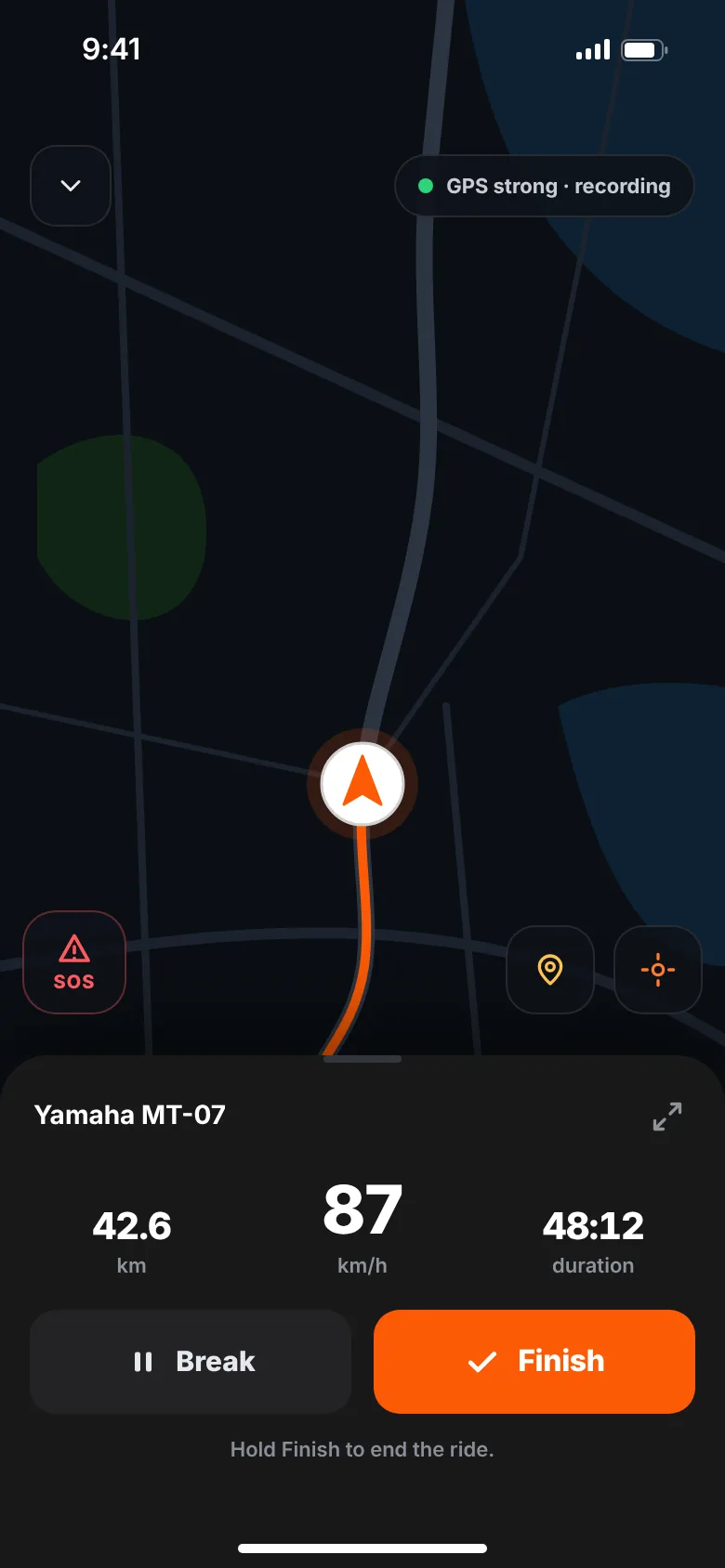
To track motorcycle rides with your phone, install a ride tracker app, allow location access "Always" so it records with the screen off, and start recording before you ride. The phone's GPS works without mobile data. To save battery, keep the screen off, carry a power bank or use a powered mount, and download offline maps.
Your phone already has everything a motorcycle GPS tracker needs: a GPS receiver, storage and a battery. The trick is setting it up so it keeps recording for hours, in a pocket, with no signal, and still has charge when you arrive. Here's how.
How does a phone track a motorcycle ride?
The GPS chip in your phone listens to satellites and works out your position, speed and heading. It doesn't need mobile data or Wi-Fi to do that. A ride tracker app saves a point every few metres, then draws the line and calculates distance, time and speed from it.
Mobile data matters for other things: loading maps, uploading the ride and sharing your live location. A good app keeps recording when the data connection drops and uploads later.
Step 1: allow location access "Always"
This is the setting that decides whether your ride is recorded at all. When the screen locks or another app is open, the phone only shares your location with apps that have background permission.
- iPhone: Settings → the app → Location → Always. Keep Precise Location on.
- Android: Settings → Apps → the app → Permissions → Location → Allow all the time. Keep Use precise location on.
Menu names vary a little between phone models and system versions.
On Android, battery optimisation can also stop apps in the background. If a ride stops recording on its own, look in the app's battery settings and allow it to run without restrictions.
Step 2: save battery while riding
High-accuracy GPS uses power, and the screen uses even more. These habits make the biggest difference:
- Keep the screen off. Lock the phone once recording starts. The screen is usually the biggest drain.
- Start full. Charge overnight before a long day.
- Bring power. A power bank in your jacket, or a USB socket and a powered mount on the bike.
- Close what you don't need. Video streaming, hotspot and games in the background all compete for battery.
- Download offline maps for navigation, so the phone doesn't keep searching for signal to load tiles.
- Mind the temperature. Batteries drain faster in the cold and can throttle in strong sun. Don't leave the phone in direct sunlight on the bars on a hot day.
Low Power Mode on iPhone and Battery Saver on Android can help, but they can also limit background activity. Test a short ride with them on before you rely on them.
Step 3: pocket or mount?
Both work for recording, because GPS doesn't care where the phone is, as long as it has a view of the sky through fabric or a tank bag.
- Pocket or tank bag: protected from weather and vibration. You can't see the screen, which is a good thing for focus. An inside jacket pocket works well.
- Handlebar mount: useful for navigation. Choose a solid mount and secure the phone with a backup tether.
A note on vibration
Strong, high-frequency vibration — common on some engines and at certain revs — can affect the camera modules in some phones, especially their image stabilisation and autofocus parts. Some phone makers warn about this for motorcycle mounts. If you mount your phone on the bars, a mount with a vibration damper reduces the risk. Check your phone maker's guidance.
Step 4: plan for no signal
The best riding roads often run through valleys and over passes with no coverage. Before you go:
- Make sure your ride tracker saves points on the phone first, not only in the cloud.
- Download offline maps for your navigation app.
- Tell someone your route if you'll be out of coverage for a long time.
Note: live location sharing needs mobile data. When you lose signal, the person following you sees the last update, not your current position.
Step 5: check your privacy settings
A ride starts and ends where you spend time — often home or work. Before you share:
- Pick who sees each ride: everyone, followers or only you.
- Consider a private account if you'd rather approve followers.
- Think about starting recording a little away from home, if you post rides publicly.
- Read what's shared and with whom in the app's privacy policy.
How to track a ride with GOEZ, step by step
- Install GOEZ on your iPhone or Android phone and sign in.
- Allow location "Always". GOEZ explains why it needs it and the start sheet reminds you before you ride.
- Add your bike to your garage (one bike on the free plan).
- Tap Start ride. The start sheet checks your GPS signal, location access and battery. A 3-second countdown and you're off.
- Lock the phone and ride. GOEZ records in the background. The status line shows "GPS strong · recording", or "Offline · points kept on the device" when you lose signal.
- Press and hold to stop, so a bump in your pocket can't end the ride. Your summary opens right away: distance, moving time, average and top speed, corners and breaks.
- Save it. Add a title and a cover photo, and choose who sees it. No signal? It uploads on its own later.
GOEZ uses high-accuracy GPS and records a point about every 15 metres while you move. Auto pause is optional and off by default. If the phone closes the app on a long ride, your points stay on the phone and you can continue the ride next time you open GOEZ. More in ride tracking.
Want someone at home to follow along? Pick a Ride Buddy — see live location and SOS. Curious how your phone estimates lean from GPS? Read what is lean angle.
Troubleshooting
| Problem | Likely cause | Fix |
|---|---|---|
| Ride stopped recording | Location not set to "Always", or battery optimisation | Set "Always" / "Allow all the time"; remove battery restrictions for the app |
| Straight lines across the map | Weak GPS in tunnels, cities or forests | Normal for short gaps; keep precise location on |
| Top speed differs from the speedometer | Speedometers often read a little high; GPS measures ground speed | Expect a small difference |
| Battery empty before the end | Screen on, cold, no charger | Lock the screen; bring a power bank or powered mount |